Guided Digital Authorization
Prepare Form 4506-C digitally through a guided process to help reduce manual work and minimize errors.
eTaxTranscript is a private paid service by Zenwork, Inc. We are not affiliated with, endorsed by, or operated by the IRS or any government agency.
Submit Form 450-C online and request your transcript online. Whether it's for income verification, tax preparation, a financial review, or client work, eTaxTranscript makes the Form 4506-C filing process easier to manage.
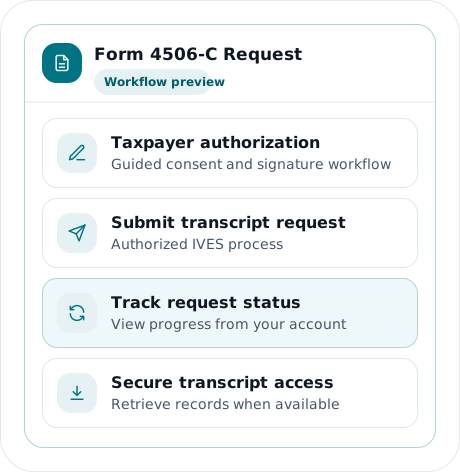
Form 4506-C, IVES Request for Transcript of Tax Return, allows an authorized IVES participant to request IRS tax transcript information with the taxpayer's consent.
eTaxTranscript simplifies the Form 4506-C request process. The platform combines authorization and transcript requests and allows you to electronically manage and monitor the requests.
Prepare Form 4506-C digitally through a guided process to help reduce manual work and minimize errors.
Electronically manage and organize transcript requests. Keep all the requests in one place without relying on a separate and manual process.
See the progress of each request with real-time updates. Identify any requests that may require attention and handle multiple client requests simultaneously.
Access and download transcripts for your tax, lending, verification, and/or financial review work.
eTaxTranscript simplifies the transcript request process by guiding you through each step, from taxpayer authorization to transcript access.
The first step is to provide consent and authorization. eTaxTranscript offers an electronic option to sign Form 8821.
You can submit a Form 4506-T transcript request through eTaxTranscript and see the status of the request.
If the request is approved, you can securely access the transcript and download a copy.
Note: The availability of the transcripts requested depends on IRS records, processing, as well as the tax years.
This transcript provides information from a tax return as it was filed. It may not include line items that were updated after the return was filed.
Bankers, tax and financial professionals, advisors, and other authorized parties may review this transcript to find the information they need.
This transcript shows payment activity and account changes/adjustments on the taxpayer’s IRS account.
Tax account transcripts are often used by tax professionals to review client account status, tax notices, and resolutions.
Wage and income transcripts contain information reported to the IRS through information returns such as W-2 and 1099.
These transcripts assist and support tax preparation, underwriting, financial review, and income verification.
Request transcripts for multiple tax years through eTaxTranscript. Availability depends on the transcript type, the tax periods requested, and the IRS records available for those periods.
Certain individuals and entities can use Form 4506-C to request tax return information. eTaxTranscript helps eligible and authorized person(s) securely access information through supported transcript requests.
Transcript requests are usually part of the client onboarding process. It supports the review of IRS notices and the preparation and review of client returns.
eTaxTranscript assists firms in centrally managing transcript requests across their client base and reduces administrative work.
Transcript data is used by lenders and financial advisors to verify income and support underwriting, helping make lending and other financial decisions.
eTaxTranscript facilitates a request for supported Form 4506-C and authorization for transcripts to make it easier to verify information using IRS transcript data.
Advisors need prior-year tax details for their clients for reviewing records, preparing tax returns, and financial analysis or projections.
eTaxTranscript requests transcripts through a centralized workflow, eliminating the need for repeated requests to clients.
Individuals need prior-year tax details for various reasons, including preparing their individual tax returns and/or other financial applications.
eTaxTranscript helps users complete the required authorization and request supported IRS tax transcripts online.
Accuracy is important when submitting Form 4506-C. The IVES guidance requires the form to be filled out correctly and properly authorized. Any incomplete or illegible forms may be rejected.
Sign Form 4506-C only after all the required line items have been completed. The IRS must receive the form within 120 days of the taxpayer's signature, or it will not be accepted.
Include the taxpayer's name and TIN. If both spouses are listed on Form 4506-C, both must sign. For a jointly filed return, either spouse can authorize a request when only that spouse is listed. Wage and Income Transcripts are provided only for the taxpayers identified in the request.
Enter the taxpayer's current address and, if different, the address shown on the last filed return. Incorrect or incomplete address information may delay processing or cause the request to be rejected.
Write the name of the tax form, such as a 1040, and select the type of transcript that you are requesting.
Enter the ending dates of the tax years or periods requested in the format specified on Form 4506-C. Transcript availability depends on the requested records and IRS processing status.
The IRS will not send transcript information to an IVES participant without a completed Form 4506-C or equivalent authorization from the taxpayer.
As of September 2026, the October 2022 revision of Form 4506-C is the latest revision the IRS accepts. Use the current IRS-accepted version to avoid processing issues.
Processing a Form 4506-C request involves multiple steps. This can involve obtaining taxpayer authorization, checking the form for accuracy, having the taxpayer sign to authorize the request, monitoring the status, and eventually retrieving the transcript. Handling each of these steps takes time, especially if you have to manage multiple clients.
Complete the authorization and request steps electronically using eTaxTranscript. You no longer need to manage requests by manually mailing or faxing forms.
View request and authorization activities without needing to make multiple follow-ups or track them in separate files.
A guided workflow helps reduce manual steps and common errors when preparing Form 4506-C requests. The IRS may reject Form 4506-C requests when required information is missing, incomplete, or illegible, or when signatures do not meet IRS requirements.
Handling just one transcript request is different from managing dozens or hundreds in a tax or financial services practice. The eTaxTranscript solution was built to help manage requests at scale.
Meet higher tax transcript request volumes without turning each client request into a separate manual job.
Group client requests and track them as they are processed. The multi-user access feature lets team members work from the same account.
Keep all transcript requests and status records in a single location. You can see what requests have been made, what are still pending, and which transcripts are ready for download.
Form 4506-C authorizes an eligible IVES participant to request IRS tax transcript information, with the taxpayer's consent.
Yes. Form 4506-C can be signed electronically when the IVES participant is authorized to accept electronic signatures and the request meets IRS requirements.
Authorized IVES participants can request transcripts once the taxpayer provides their consent.
Yes. eTaxTranscript lets you follow your request's status while it's being processed.
Common causes of Form 4506-C rejection include missing, incorrect, incomplete, or illegible information, and requests that aren't properly authorized. The IRS also rejects forms submitted more than 120 days after they are signed by the taxpayer.
Form 4506-C is used by authorized IVES participants to request tax transcript information with the taxpayer's consent. Form 4506-T is used to request tax transcripts outside the IVES program, including requests made by taxpayers or their authorized representatives.
Yes. eTaxTranscript supports bulk transcript requests and multi-client workflows for professional firms.
Authorize digitally, manage your Form 4506-C requests, and track their status. Download available transcripts securely, in a single guided workflow.
Request a Tax Transcript